Switch from Fresha
Bring your clients and services with you.
Clients, services and past totals come over; photos and forms stay in Fresha. Future bookings are entered again; past visits come over as history.
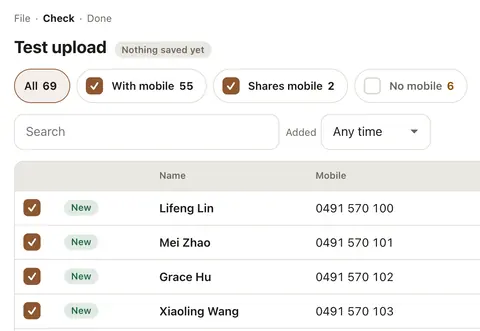
A Fresha file of 12,721 clients imports in one go (our test).
- 1Export your clients from Fresha
Fresha exports your client list as Excel or CSV.
- 2Import clients
Drop the file in, check the table, save. Mobiles, notes and past totals come too, and the whole import can be undone for 24 hours.
- 3Import your services
Fresha's price list PDF, or a CSV: names, prices, durations and categories.
- 4Print the QR poster
Counter, door or mirror. One scan and they're booking.
- Or we set it up for you: A$499 once
We import your clients and services, set up your staff and print your poster.
What transfers
What moves, and what stays.
| Clients | ✓ Yes | Name, mobile, email, notes, consent, past totals, record codes |
|---|---|---|
| Services | ✓ Yes | Name, category, price, duration, staff |
| Packages / session cards | Not yet | Type them in with the balances template (Settings › Clients & import) |
| Bookings | Not yet | Future bookings are entered again; past visits can come in as history |
| Photos | ✗ No | Photos stay in the old system; save them yourself |